Overview
A staff scheduling and rota planning demo for teams that need a clearer view of shifts, availability, and coverage.
Case Study
Why I built it.
Role
Full-stack developer
Audience
Managers and team leads in rota-heavy businesses such as hospitality, retail, care, field services, and shift-based local operations.
Business Problem
Rota planning breaks down when shifts, availability, open cover, time off, labour targets, and manager approvals are tracked in separate places. Managers need to spot gaps before the week starts and understand the labour impact of schedule changes.
Approach
How I approached it.
01
Built the demo around a fictional cafe team so the rota, staff records, availability, time off, labour, and settings screens all tell one coherent operations story.
02
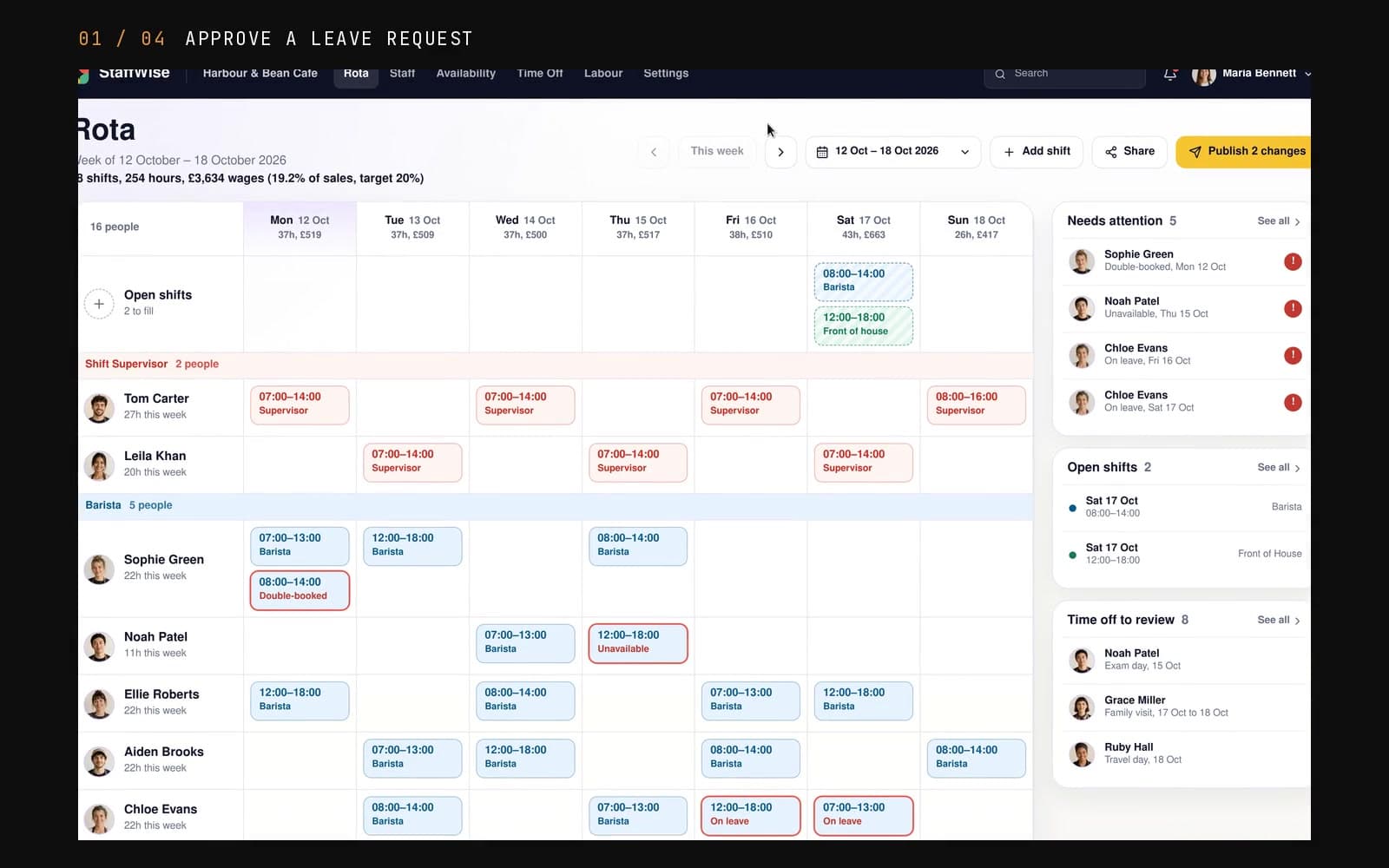
Made the rota interactive rather than static, with week navigation, open cover, staff assignment context, and schedule actions designed for repeated manager use.
03
Added availability and labour views so the demo proves more than a calendar: it shows planning constraints, coverage state, and spend visibility.
04
Kept StaffWise safe to share with source-controlled demo data and browser persistence only; no payroll, HR, or production staff records are connected.
Build Notes
Technical shape.
Project Type
Rota planning demo
Primary Workflow
Weekly rota planning to coverage and labour review
Data Mode
Demo data plus browser localStorage
Deployment
Docker and Coolify on x-os
What It Shows
Why it is useful.
Shows a real interactive product flow for rota planning rather than a static scheduling mockup.
Shows UI for shifts, staff availability, open cover, labour spend, and manager actions.
Gives a clear example for businesses that need internal tools for scheduling and team planning.
Keeps the public demo separate from any real HR, payroll, or staff-management data.
Screenshots
Screens that matter.
Each capture uses safe demo data and shows the parts a real user would care about: the main view, the deeper work screens, and the handoff or customer-facing state.

Rota Planner
Weekly rota view with shift assignments, open cover, labour metrics, quick actions, and a publish prompt for unresolved gaps.

Availability Grid
Planning view showing who can work across day parts, where staff are unavailable, and which coverage assumptions need checking.

Labour Visibility
Labour forecasting screen that connects rota decisions to spend, targets, weekly cost movement, and manager-facing controls.
Demo Limits
StaffWise uses fictional cafe data and local demo persistence only. A real workforce product would need authentication, tenant isolation, audit trails, payroll or HR integration boundaries, and backup rules before production use.
The Challenge
Rota planning becomes fragile when managers rely on spreadsheets, messages, and last-minute memory. Teams need a cleaner way to see who is working, where the gaps are, and what changed.
The Solution
I built a workforce planning demo with schedule-focused screens, staff visibility, and manager tools that could be adapted for hospitality, care, retail, or field teams.
Live
Demo Status
Rota
Use Case
Shifts
Core Flow
Teams
Focus
Key Features
What it does.
01
Rota Overview
A manager-friendly view of shifts, coverage, and upcoming rota pressure.
02
Staff Availability
Workspace patterns for showing who is available, who is assigned, and where changes are needed.
03
Operational UI
Forms, cards, tables, and status views designed for repeated day-to-day use.
04
Responsive Screens
Dashboard layouts that can work across desktop and smaller review screens.
05
Live Demo Hosting
Live on x-os through Coolify with a public HTTPS demo URL.
06
Reusable Scheduling Patterns
The project shows scheduling, status, and admin patterns that apply to a lot of team-management tools.
Tech Stack
Built with.
Frontend
Backend
Data
Infra