Overview
A lead intake demo for capturing enquiries, organising follow-up, and showing where AI-style review can help a team respond faster.
Case Study
Why I built it.
Role
Full-stack developer
Audience
Small service businesses and sales teams that receive enquiries from multiple channels and need a more consistent follow-up process.
Business Problem
Inbound leads often arrive as messy notes, calls, forms, and messages. Teams need help turning that raw context into a clear pipeline, but AI only helps when it is attached to a review process for quoting and follow-up.
Approach
How I approached it.
01
Modelled a fictional service-business pipeline with enquiries, customers, services, quotes, follow-ups, and review states.
02
Designed the assisted review layer around useful sales context: summaries, triage, response readiness, and next actions sit beside the lead data.
03
Built public intake and admin review surfaces so the demo shows both sides of the flow: enquiry capture and internal follow-up.
04
Kept the current product in seeded demo mode, with CRM sync, email sending, and model-provider integrations treated as future production work.
Build Notes
Technical shape.
Project Type
Lead intake demo
Primary Workflow
Lead intake to assisted review and follow-up
Data Mode
Seeded fictional in-memory demo data
Deployment
Docker and Coolify on x-os
What It Shows
Why it is useful.
Shows AI-style support inside a real review flow rather than as a loose chatbot feature.
Connects lead capture, pipeline health, quote status, follow-up pressure, and human review in one product surface.
Shows how assisted review tools can support service-business sales without exposing real customer data.
Useful for client conversations about intake forms, CRM-lite systems, admin automation, and follow-up.
Screenshots
Screens that matter.
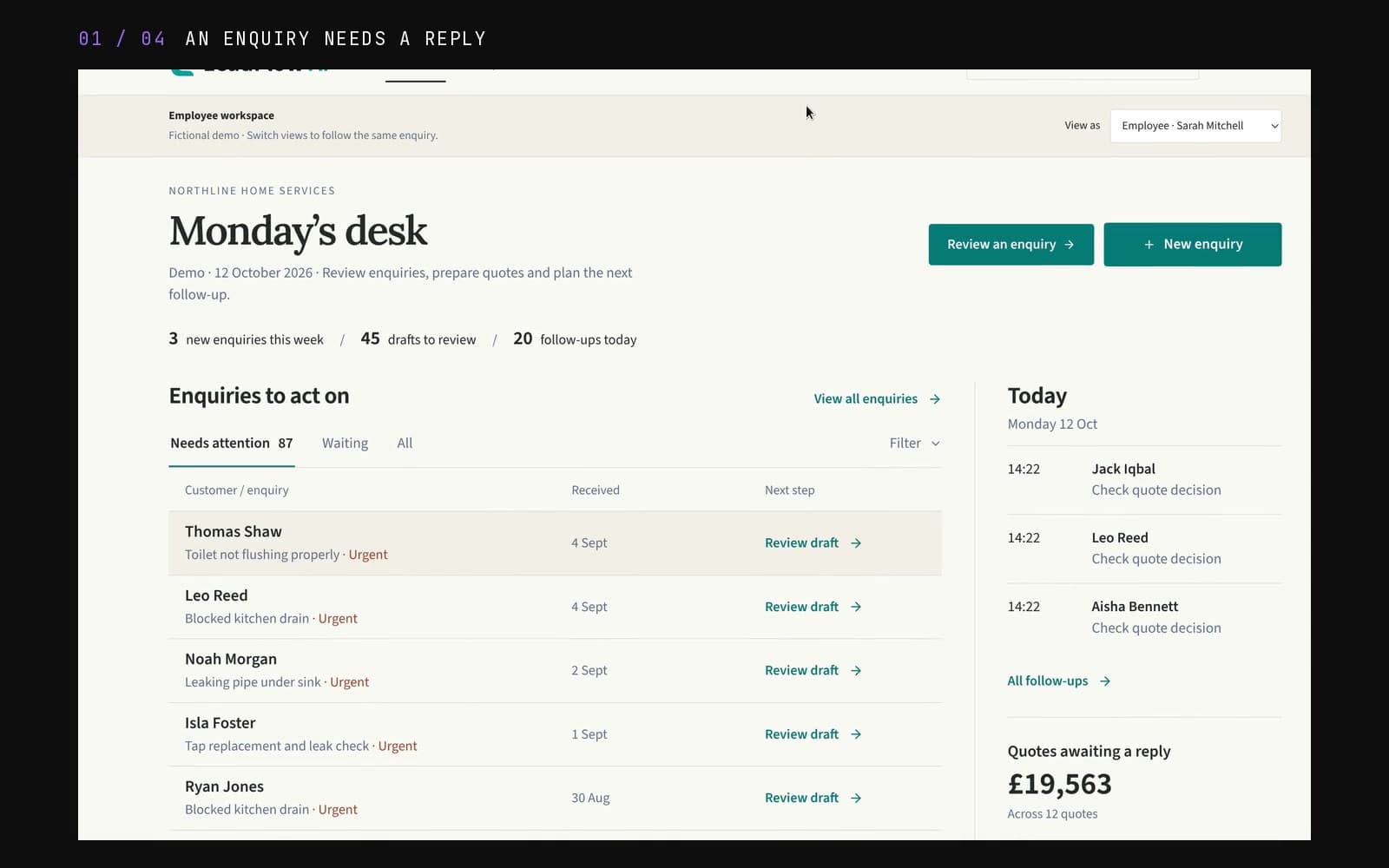
Each capture uses safe demo data and shows the parts a real user would care about: the main view, the deeper work screens, and the handoff or customer-facing state.

AI Operations Dashboard
Pipeline overview showing new enquiries, replies ready for review, quote value, conversion signals, urgent leads, follow-ups, and review queues.

Lead Review Workspace
Lead-management surface for reviewing enquiry context, reply readiness, service needs, urgency, and the next human action.

Public Intake Form
Customer-facing enquiry form for capturing service needs, contact details, urgency, and consent before the assisted review workflow begins.
Demo Limits
LeadFlowAI uses fictional demo data. Real customer data, email sending, CRM sync, and model-provider integrations would need a separate production design with auth, consent, audit, and data-retention rules.
The Challenge
Many small teams lose leads because enquiries arrive in different places and follow-up depends on memory. AI can help, but only when it is attached to a review process people can trust.
The Solution
I built a demo that treats AI as support for the human review step: capture the lead, organise the context, show next actions, and keep the handoff clear.
Live
Demo Status
Leads
Use Case
AI
Core Flow
Sales
Focus
Key Features
What it does.
01
Lead Capture Flow
Screens and data shapes for collecting enquiry details and preparing them for follow-up.
02
Assisted Review Context
Patterns for turning raw enquiries into summaries, notes, and recommended next steps.
03
Follow-Up Workspace
A practical dashboard shape for tracking active opportunities and admin actions.
04
SaaS Demo Structure
Built as a safe public demo app, not just a static marketing page.
05
Live Demo
Hosted through Coolify on x-os with a dedicated public HTTPS domain.
06
Useful Client Pattern
Shows how AI can support an existing sales process instead of being added for show.
Tech Stack
Built with.
Frontend
Backend
Data
Infra