Overview
A client-facing project portal for progress updates, deliverables, files, and clearer communication during ongoing work.
Case Study
Why I built it.
Role
Full-stack developer
Audience
Freelancers, small agencies, consultants, and service businesses that need a clearer way to show project progress.
Business Problem
Client work often spreads across messages, email threads, shared folders, invoices, and ad hoc updates. Clients lose visibility, and the person doing the work spends time explaining status instead of moving the project forward.
Approach
How I approached it.
01
Separated the real freelance portal from the public demo so production data stays private.
02
Designed the demo around the work a freelancer actually tracks: intake, clients, projects, tasks, quotes, invoices, and a client-facing progress view.
03
Used structured project data so updates, deliverables, and handoff material can be maintained without rewriting everything from scratch.
04
Kept the public version safe to share by using fictional data and a separate HTTPS demo domain.
Build Notes
Technical shape.
Project Type
Client portal demo
Primary Workflow
Client request to project progress
Backend
Next.js APIs, Prisma, PostgreSQL-ready models
Deployment
Separate production and demo surfaces
What It Shows
Why it is useful.
Shows a realistic client/project flow around clients, tasks, quotes, invoices, and updates.
Demonstrates how to separate a real production app from a safe public demo.
Makes the offer concrete for clients who need portals, dashboards, or admin tools.
Supports screenshots, live walkthroughs, and proposal links without exposing private client data.
Screenshots
Screens that matter.
Each capture uses safe demo data and shows the parts a real user would care about: the main view, the deeper work screens, and the handoff or customer-facing state.

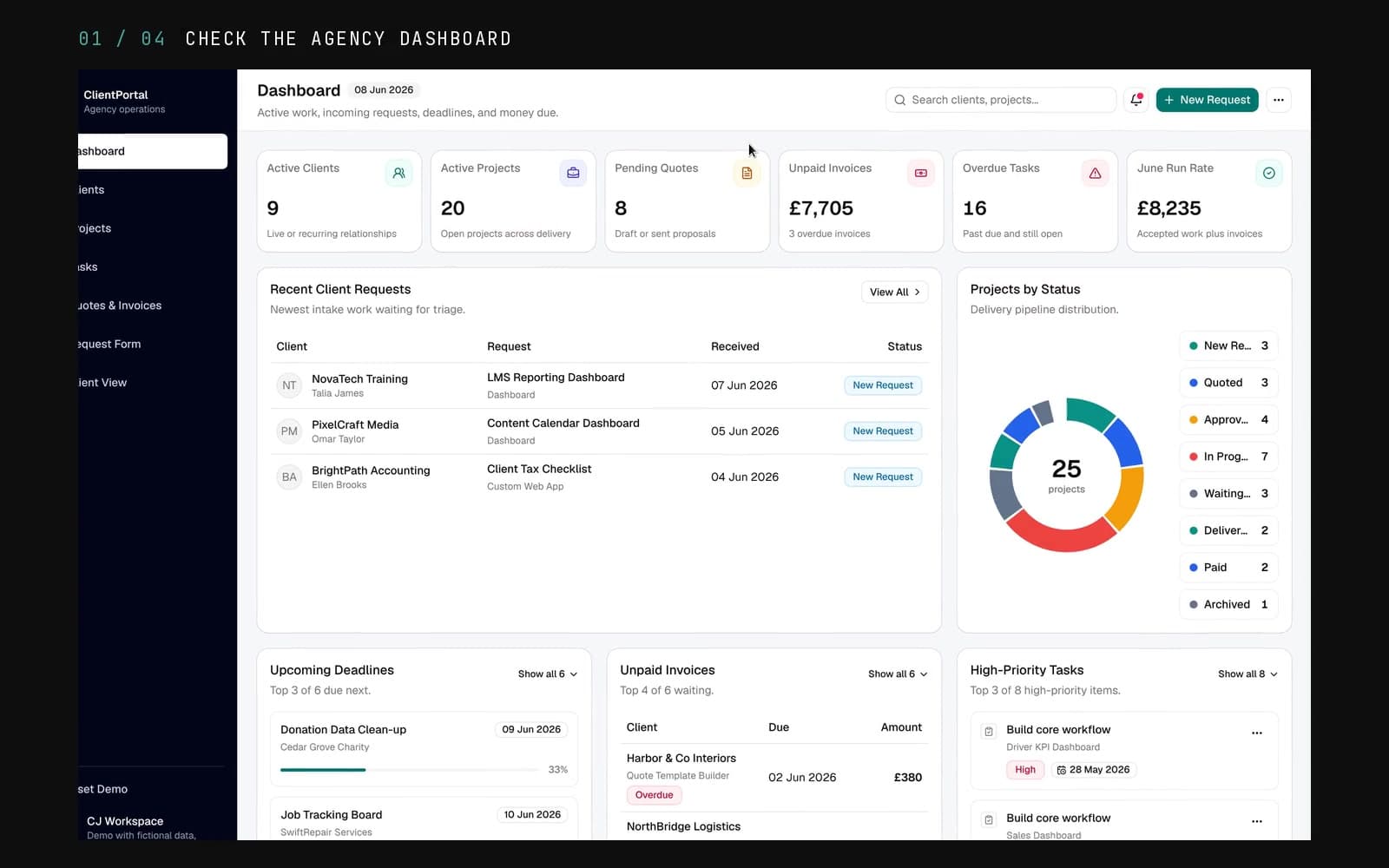
Project Dashboard
Client-facing overview for active work, recent updates, pending commercial items, overdue tasks, and requests that need a response.

Admin Workspace
Internal workspace for tracking projects, statuses, values, delivery dates, and follow-up across multiple clients.

Client View
Read-only client view for showing progress, files, decisions, and handoff material without exposing private admin tools.
Demo Limits
The public ClientPortal demo uses fictional/demo data. The real production freelance portal lives separately and should not be exposed through portfolio links.
The Challenge
Small freelance and agency projects can quickly spread across email, chat, documents, and screenshots. Clients want visibility, and builders need a simple way to show progress without writing a fresh status report every time.
The Solution
I built a client portal demo that brings project status, deliverables, notes, files, and update history into one place that could grow into a real client operations system.
Live
Demo Status
Clients
Use Case
Portal
Core Flow
Trust
Focus
Key Features
What it does.
01
Client Project Dashboard
A clear project overview for status, recent updates, next steps, and active deliverables.
02
Progress Tracking
Work can be grouped into milestones, tasks, or updates so clients can see progress without asking for another status report.
03
Deliverable Workspace
Structured areas for links, files, notes, and client-facing handoff material.
04
Admin-Friendly Flow
Built around the kind of repeated project updates a freelancer or small team needs to maintain.
05
Production-Demo Hosting
Deployed on x-os through Coolify with a dedicated HTTPS demo domain.
06
Ready For Real Accounts
Structured so authentication, notifications, billing, and customer-specific workspaces can be added later.
Tech Stack
Built with.
Frontend
Backend
Data
Infra